‏إظهار الرسائل ذات التسميات Forensic. إظهار كافة الرسائل

الأربعاء، 4 مارس 2015

Nuke-IOS An Auditing Tool To Test ARP Attacks For iOS


Nuke-IOS An Auditing Tool To Test ARP Attacks For iOS.

Its an auditing tool to test ARP attacks, can easily be avoided using Static-ARP entries on hosts or with AP isolation. Nuke-IOS (beta) Automated ARP poisoning script for IOS.

What Is ARP Poisoning?
ARP Poisoning attack is a type of attack. Generally, the aim is to associate the attacker's MAC address with the IP address of another host, such as the default gateway, causing any traffic meant for that IP address to be sent to the attacker instead.

ARP spoofing may allow an attacker to intercept data frames on a network, modify the traffic, or stop all traffic. Often the attack is used as an opening for other attacks, such as denial of service, man in the middle, or session hijacking attacks.

The attack can only be used on networks that use the Address Resolution Protocol.  Soon its support for SBsettings toggle, yes, one simple button that takes down an entire /24 network in seconds.

Depends on:
mptcp network-cmds

Download

الثلاثاء، 27 يناير 2015

Get Original IP Address Of Any User From STUN IP Address Requests For WebRTC

Get Original IP Address Of Any User From STUN IP Address Requests For WebRTC

Firefox and Chrome have implemented WebRTC that allow requests to STUN servers be made that will return the local and public IP addresses for the user. These request results are available to javascript, so you can now obtain a users local and public IP addresses in javascript. This demo is an example implementation of that.

What is STUN Server?
A STUN (Session  Traversal of User Datagram Protocol [UDP] Through Network Address Translators [NATs]) server allows NAT clients (i.e. IP Phones behind a firewall) to setup phone calls to a VoIP provider hosted outside of the local network.

The STUN server allows clients to find out their public address, the type of NAT they are behind and the internet side port associated by the NAT with a particular local port. The STUN protocol is defined in RFC 3489.

The STUN protocol allows applications operating behind a network address translator (NAT) to discover the presence of the network address translator and to obtain the mapped (public) IP address (NAT address) and port number that the NAT has allocated for the application's User Datagram Protocol (UDP) connections to remote hosts. The protocol requires assistance from a third-party network server (STUN server) located on the opposing (public) side of the NAT, usually the public Internet.

Additionally, these STUN requests are made outside of the normal XMLHttpRequest procedure, so they are not visible in the developer console or able to be blocked by plugins such as AdBlockPlus or Ghostery. This makes these types of requests available for online tracking if an advertiser sets up a STUN server with a wildcard domain.

Code
Here is the annotated demo function that makes the STUN request. You can copy and paste this into the Firefox or Chrome developer console to run the test.

Get the IP addresses associated with an account

function getIPs(callback){
    var ip_dups = {};

    //compatibility for firefox and chrome
    var RTCPeerConnection = window.RTCPeerConnection
        || window.mozRTCPeerConnection
        || window.webkitRTCPeerConnection;
    var mediaConstraints = {
        optional: [{RtpDataChannels: true}]
    };

    //firefox already has a default stun server in about:config
    //    media.peerconnection.default_iceservers =
    //    [{"url": "stun:stun.services.mozilla.com"}]
    var servers = undefined;

    //add same stun server for chrome
    if(window.webkitRTCPeerConnection)
        servers = {iceServers: [{urls: "stun:stun.services.mozilla.com"}]};

    //construct a new RTCPeerConnection
    var pc = new RTCPeerConnection(servers, mediaConstraints);

    //listen for candidate events
    pc.onicecandidate = function(ice){

        //skip non-candidate events
        if(ice.candidate){

            //match just the IP address
            var ip_regex = /([0-9]{1,3}(\.[0-9]{1,3}){3})/
            var ip_addr = ip_regex.exec(ice.candidate.candidate)[1];

            //remove duplicates
            if(ip_dups[ip_addr] === undefined)
                callback(ip_addr);

            ip_dups[ip_addr] = true;
        }
    };

    //create a bogus data channel
    pc.createDataChannel("");

    //create an offer sdp
    pc.createOffer(function(result){

        //trigger the stun server request
        pc.setLocalDescription(result, function(){});

    }, function(){});
}

//Test: Print the IP addresses into the console
getIPs(function(ip){console.log(ip);});

Download

الأربعاء، 17 ديسمبر 2014

SSH Key Generator POC One Keypair At A Time


SSH Key Generator POC One Keypair At A Time. A utility for deterministically generating SSH keypairs.

SSH uses public-key cryptography to authenticate the remote computer and allow it to authenticate the user, if necessary. There are several ways to use SSH; one is to use automatically generated public-private key pairs to simply encrypt a network connection, and then use password authentication to log on..

Each keypair is generated by hashing together a "seed" or "master key" (should be at least 32 bytes, randomly generated, and kept secret) and a unique "handle" (using the same handle will result in the same keypair, but the handle does not need to be kept secret); the resulting SHA256 hash is used as the input for generating an Ed25519 keypair.

This allows the creation of a large number of unique keypairs without having to actually manage the keypairs individually. This allows for, say, using a different keypair for every host you need to log into, thus preventing someone from correlating different user accounts on different hosts by the public keys in authorized_keys.

This proof of concept implementation just generates one keypair at a time; ideally the keypairs would be generated on demand, perhaps by an SSH agent implementation (the key generation step should only take a few milliseconds).

Note that while Ed25519 allows for using any 32-byte input to generate a keypair, making this implementation trivial, implementing a similar scheme for other key types is probably possible in some cases (eg. ECDSA), and infeasible in others (DSA/RSA, probably).

Usage
You will need ghc and cabal, as well as the libsodium development files; on Debian/Ubuntu, the ghc and libsodium-dev packages are what you need.

$ git clone https://github.com/mithrandi/ssh-key-generator.git
$ cd ssh-key-generator
$ cabal sandbox init
$ cabal install
$ head -c 32 /dev/urandom > seed
$ cabal run ./seed HIMOM ./id_ed25519
$ ssh-keygen -y -f ./id_ed25519

./seed is the master key, HIMOM is the key handle, and ./id_ed25519 is the output file into which the private key will be placed. ssh-keygen is then invoked to print the public key out.

Download now

الأربعاء، 1 أكتوبر 2014

Shellshock BUG: Just For Fun With Netsparker

Shellshock BUG: just 4 fun with netsparker

Scan By Netsparker

Well, I thought I'd explore a current issue, then let's talk about ShellShock.

Recently, security experts disclose the discovery of a bug that affects Linux systems using Bash, the shell quite popular in *nix systems, such as Linux and OS X, Apple.

Stephane Chazelas a free software enthusiast, discovered the flaw.
Look for CVE-2014-6271

The vulnerability is globally known as Shell Shock; a reference to the environment explored by the bug, known as shell (used for interacting with the operating system through commands). The shell in question bears the name of Bash, an acronym for Bourne Again Shell.

The Bash is currently the most common shell in use, and is installed on most Linux servers in the world. The flaw allows an unauthorized person, remotely execute commands on the affected machines. Given the breadth with which Bash is used, from servers to embedded systems (cameras, routers, commercial terminals), the potential for harm is so huge, as Heartbleed, another flaw found in OpenSSL earlier this year.

The National Institute of Standards and Technology of USA assigned to Shellshock note 10, the maximum on the scale, in terms of severity, impact and exploitation, and to make matters worse the same agency said the fault is of low complexity, which means it can be easily used.

  •  Besides the update of the servers, it is important to monitor all activities, and take all appropriate measures to ensure the safety of websites, emails and other data stored on your company's servers.
  •  Keep updated scripts: always take care to update all other scripts (like WordPress, Joomla, or any use that) to the latest version available.
  • Use updated software: it is important to use the latest version, since many times the software is updated solely for the purpose of performing any security fix.
Software is written by humans and even with auxiliary tools to minimize errors, they are still susceptible to vulnerabilities. Anyway to error is natural.

About Netsparker:

Netsparker is the Web Application Security Scanner can find and report web application vulnerabilities such as SQL Injection and Cross-site Scripting (XSS) and security issues on all web applications and websites regardless of the platform and the technology they are built on. 


Netsparker is very easy to use and its unique detection and safe exploitation techniques allow it to be dead accurate in reporting hence it is the first and only False Positive Free web vulnerability scanner, therefore users can focus on remediating reported vulnerabilities and security issues without wasting time on learning how to use the web vulnerability scanner or verify its findings.


Download Netsparker

Article by Rafael Fontes Souza.

الخميس، 7 أغسطس 2014

Honeypot Linux Distro HoneyDrive 3 Released


Honeydrive New Version 3 has been released. HoneyDrive is the premier honeypot Linux distro. It is a virtual appliance (OVA) with Xubuntu Desktop 12.04.4 LTS edition installed. It contains over 10 pre-installed and pre-configured honeypot software packages such as Kippo SSH honeypot, Dionaea and Amun malware honeypots, Honeyd low-interaction honeypot, Glastopf web honeypot and Wordpot, Conpot SCADA/ICS honeypot, Thug and PhoneyC honeyclients and more. Additionally it includes many useful pre-configured scripts and utilities to analyze, visualize and process the data it can capture, such as Kippo-Graph, Honeyd-Viz, DionaeaFR, an ELK stack and much more. Lastly, almost 90 well-known malware analysis, forensics and network monitoring related tools are also present in the distribution.

HoneyDrive 3 RELEASE NOTES:
1) HoneyDrive 3 has been created entirely from scratch. It is based on Xubuntu Desktop 12.04.4 LTS edition and it is distributed as a standalone OVA file that can be easily imported as a virtual machine using virtualization software such as VirtualBox and VMware.

2) All the honeypot programs from the previous version of HoneyDrive are included, while they have also been upgraded to their latest versions and converted almost entirely to cloned git repos for easier maintenance and updating. This latter fact on its own could be considered reason enough to release the new version.

3) Many new honeypot programs have been installed that really make HoneyDrive 3 “complete” in terms of honeypot technology, plus around 50(!) new security related tools in the fields of malware analysis, forensics and network monitoring.

4) The main honeypot software packages and BruteForce Lab’s projects reside in /honeydrive. The rest of the programs reside in /opt. The location of all software can be found inside the README.txt file on the desktop.

5) HoneyDrive 3 doesn’t make itself as known to the outside world as the previous version. There are no descriptive messages and apart from Kippo-Graph and Honeyd-Viz every other piece of software is not accessible from the outside (unless if you configure them otherwise, or even lock down Kippo-Graph and Honeyd-Viz as well).

Download now

الأربعاء، 23 يوليو 2014

CodeSake Dawn Source Code Security Scanner For Ruby Platform


Codesake Dawn is a source code scanner designed to review your code for security issues. Codesake Dawn is able to scan your ruby standalone programs but its main usage is to deal with web applications. It supports applications written using majors MVC (Model View Controller) frameworks, like:

Installation

codesake-dawn rubygem is cryptographically signed. To be sure the gem you install hasn’t been tampered, you must first add paolo@codesake.com public signing certificate as trusted to your gem specific keyring.
$ gem cert --add <(curl -Ls https://raw.githubusercontent.com/codesake/codesake-dawn/master/certs/paolo_at_codesake_dot_com.pem)
You can install latest Codesake::Dawn version, fetching it from Rubygems by typing:
$ gem install codesake-dawn -P MediumSecurity
The MediumSecurity trust profile will verify signed gems, but allow the installation of unsigned dependencies. This is necessary because not all of Codesake::Dawn’s dependencies are signed, so we cannot use HighSecurity.
In order to install a release candidate version, the gem install command line is the following:
$ gem install codesake-dawn --pre -P MediumSecurity
If you want to add dawn to your project Gemfile, you must add the following:
group :development do
gem 'codesake-dawn', :require=>false
end

And then upgrade your bundle
$ bundle install
You may want to build it from source, so you have to check it out from github first:
$ git clone https://github.com/codesake/codesake-dawn.git
$ cd codesake-dawn
$ bundle install
$ rake install

And the codesake-dawn gem will be built in a pkg directory and then installed on your system. Please note that you have to manage dependencies on your own this way. It makes sense only if you want to hack the code or something like that.

Usage

You can start your code review with Codesake::Dawn very easily. Simply tell the tool where the project root directory.
Underlying MVC framework is autodetected by Codesake::Dawn using target Gemfile.lock file. If autodetect fails for some reason, the tool will complain about it and you have to specify if it's a rails, sinatra or padrino web application by hand.
Basic usage is to specify some optional command line option to fit best your needs, and to specify the target directory where your code is stored.
$ dawn [options] target
In case of need, there is a quick command line option reference running dawn -h at your OS prompt.
Help Options
$ dawn -h
Usage: dawn [options] target_directory

Examples:
$ dawn a_sinatra_webapp_directory
$ dawn -C the_rails_blog_engine
$ dawn -C --json a_sinatra_webapp_directory
$ dawn --ascii-tabular-report my_rails_blog_ecommerce
$ dawn --html -F my_report.html my_rails_blog_ecommerce

-r, --rails force dawn to consider the target a rails application
-s, --sinatra force dawn to consider the target a sinatra application
-p, --padrino force dawn to consider the target a padrino application
-G, --gem-lock force dawn to scan only for vulnerabilities affecting dependencies in Gemfile.lock
-a, --ascii-tabular-report cause dawn to format findings using table in ascii art
-j, --json cause dawn to format findings using json
-C, --count-only dawn will only count vulnerabilities (useful for scripts)
-z, --exit-on-warn dawn will return number of found vulnerabilities as exit code
-F, --file filename tells dawn to write output to filename
-c, --config-file filename tells dawn to load configuration from filename

Disable security check family

--disable-cve-bulletins disable all CVE security checks
--disable-code-quality disable all code quality checks
--disable-code-style disable all code style checks
--disable-owasp-ror-cheatsheet disable all Owasp Ruby on Rails cheatsheet checks
--disable-owasp-top-10 disable all Owasp Top 10 checks

Flags useful to query Codesake::Dawn

-S, --search-knowledge-base [check_name] search check_name in the knowledge base
--list-knowledge-base list knowledge-base content
--list-known-families list security check families contained in dawn's knowledge base
--list-known-framework list ruby MVC frameworks supported by dawn

Service flags

-D, --debug enters dawn debug mode
-V, --verbose the output will be more verbose
-v, --version show version information
-h, --help show this help

Download

الأربعاء، 2 يوليو 2014

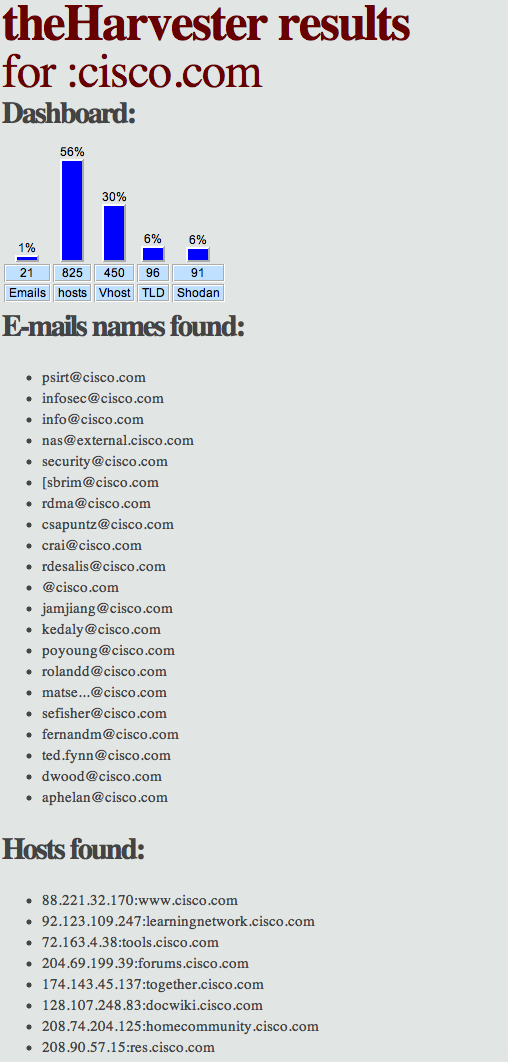
Use Harvester For Information Gathering And Penetration Testing


Use Harvester For Information Gathering And Penetration Testing. The Harvester is a tool for information gathering of e-mail accounts, sub domain names, virtual hosts, open ports/ banners, and employee names from different public sources (search engines, PGP key servers). 

Is a really simple tool, but very effective for the early stages of a penetration test or just to know the visibility of your company in the Internet.

Important Addons built inside:

-> PGP: pgp key server - www.rediris.es/keyserver/

-> Linkedin: google search engine, specific search for Linkedin users

-> Shodan: Shodan Computer search engine, will search for ports and banner of the discovered hosts  (http://www.shodanhq.com/).
SHODAN is a search engine that lets you find specific computers (routers, servers, etc.) using a variety of filters. Some have also described it as a public port scan directory or a search engine of banners.


-> vhost: Bing virtual hosts search

New Features:

> Time delays between request
> All sources search
> Virtual host verifies
> Active enumeration (DNS enumeration, Reverse lookups, TLD expansion)
> Integration with SHODAN computer database, to get the open ports and banners
> Save to XML and HTML
> Basic graph with stats


الجمعة، 20 يونيو 2014

UMAP To Test the Security Of USB Host Implementations


UMAP To Test the Security Of USB Host Implementations. Its is a tool which allows you to test the security of USB host implementations i.e. something you plug a USB device into, like a PC or a tablet. Its primary function at the moment is a fuzzer with test cases based on a combination of data from standards documentation and the author's experience of where USB bugs are commonly found. However, it also has additional functionality that will be expanded further in future versions, for example:

> Operating system identification
> Installed application identification
> Vendor-specific driver enumeration
> Endpoint Protection System assessment

Running Umap

umap is written in Python so to run it just type:
$ sudo python3 umap.py
(umap must be run as root)
---------------------------------------
_ _ _ __ ___ __ _ _ __
| | | | '_ ` _ \ / _` | '_ \
| |_| | | | | | | (_| | |_) |
\__,_|_| |_| |_|\__,_| .__/
|_|

The USB host assessment tool
Andy Davis, NCC Group 2013
Version: 1.01

Based on Facedancer by Travis Goodspeed

For help type: umap.py -h
---------------------------------------

Error: Facedancer serial port not supplied
As you can see, it complains that you haven't supplied the serial port to which the Facedancer is connected. By typing umap.py -h you can see how to do this:
Usage: umap.py

Options:
--version show program's version number and exit
-h, --help show this help message and exit
-P SERIAL Facedancer serial port **Mandatory option** (SERIAL=/dev/ttyX
or just 1 for COM1)
-L List device classes supported by umap
-i identify all supported device classes on connected host
-c CLS identify if a specific class on the connected host is supported
(CLS=class:subclass:proto)
-O Operating system identification
-e DEVICE emulate a specific device (DEVICE=class:subclass:proto)
-v VID specify Vendor ID (hex format e.g. 1a2b)
-p PID specify Product ID (hex format e.g. 1a2b)
-r REV specify product Revision (hex format e.g. 1a2b)
-f FUZZC fuzz a specific class (FUZZC=class:subclass:proto:E/C/A[:start
fuzzcase])
-s FUZZS send a single fuzz testcase
(FUZZS=class:subclass:proto:E/C:Testcase)
-d DLY delay between enumeration attempts (seconds): Default=1
-l LOG log to a file
-R REF Reference the VID/PID database (REF=VID:PID)
-u update the VID/PID database (Internet connectivity required)

Experimental Options:
-A APPLE emulate an Apple iPhone device (APPLE=VID:PID:REV)
-b VENDOR brute-force vendor driver support (VENDOR=VID:PID)

The only mandatory option is -P to provide the serial port that the Facedancer board is connected to e.g.
$ sudo python3 umap.py -P /dev/ttyUSB0

First - what drivers are supported?

In order to fuzz a USB host you need to emulate the process of physical insertion and removal of your virtual device. The USB design is expecting this process to be performed by a human and therefore, attempting to perform the operation too quickly results in the host getting confused (...but that a whole different area of potential research). As a result, USB fuzzing can be very slow (7-10 seconds per fuzz test case) so it's very important to be able to enumerate what classes of USB device are supported by the host before you start fuzzing.
To display which device classes umap can emulate use the -L option, which results in something like this:
XX:YY:ZZ - XX = Class : YY = Subclass : ZZ = Protocol
01:01:00 - Audio : Audio control : PR Protocol undefined
01:02:00 - Audio : Audio streaming : PR Protocol undefined
02:02:01 - CDC Control : Abstract Control Model : AT commands V.250
02:03:ff - CDC Control : Telephone Control Model : Vendor specific
02:06:00 - CDC Control : Ethernet Networking Control Model : No class-specific protocol required
03:00:00 - Human Interface Device : No subclass : None
06:01:01 - Image : Still image capture device : Bulk-only protocol
07:01:02 - Printer : Default : Bidirectional interface
08:06:50 - Mass Storage : SCSI : BBB
09:00:00 - Hub : Default : Default
0a:00:00 - CDC Data : Default : Default
0b:00:00 - Smart Card : Default : Default
As you can see, USB class information is represented by three bytes, the first being the base class e.g. 08 = Mass Storage class, the second is the sub-class e.g. 06 = SCSI (for Mass Storage) and the third is the protocol e.g. BBB (for Mass Storage).
In order to identify which of these virtual devices is supported by the USB host that your are testing, use the following command:
$ sudo python3 umap.py -P /dev/ttyUSB0 -i

01:01:00 - Audio : Audio control : PR Protocol undefined
**SUPPORTED**
01:02:00 - Audio : Audio streaming : PR Protocol undefined
**SUPPORTED**
02:02:01 - CDC Control : Abstract Control Model : AT commands V.250

02:03:ff - CDC Control : Telephone Control Model : Vendor specific

02:06:00 - CDC Control : Ethernet Networking Control Model : No class-specific protocol required

03:00:00 - Human Interface Device : No subclass : None
**SUPPORTED**
06:01:01 - Image : Still image capture device : Bulk-only protocol
**SUPPORTED**
07:01:02 - Printer : Default : Bidirectional interface

08:06:50 - Mass Storage : SCSI : BBB
**SUPPORTED**
09:00:00 - Hub : Default : Default
**SUPPORTED**
0a:00:00 - CDC Data : Default : Default
**SUPPORTED**
0b:00:00 - Smart Card : Default : Default
The output above shows that the Audio device class is supported, but CDC is not. The -c option allows you to test if specific device classes are supported by the host rather than cycling through all of them.

Emulating a virtual USB device

Now that we know what classes are supported we can emulate a device and virtually connect it to the USB target host. Below is output of umap emulating a Still image capture device connected to an Ubuntu Linux host, which concluded with Linux starting the Shotwell application and displaying an image that is stored on the virtual USB camera device:
$ sudo python3 umap.py -P /dev/ttyUSB0 -e 06:01:01

Emulating 06:01:01 - Image : Still image capture device : Bulk-only protocol
Facedancer reset
GoodFET monitor initialized
MAXUSB initialized
MAXUSB enabled
MAXUSB revision 19
MAXUSB connected device USB image device
USB image device received request dir=1, type=0, rec=0, r=6, v=256, i=0, l=64
USB image device received GET_DESCRIPTOR req 1, index 0, language 0x0000, length 64
MAXUSB wrote 12 01 00 02 00 00 00 40 da 04 74 23 10 00 01 02 03 01 to endpoint 0
USB image device received request dir=0, type=0, rec=0, r=5, v=15, i=0, l=0
USB image device received SET_ADDRESS request for address 15
USB image device received request dir=1, type=0, rec=0, r=6, v=256, i=0, l=18
USB image device received GET_DESCRIPTOR req 1, index 0, language 0x0000, length 18
MAXUSB wrote 12 01 00 02 00 00 00 40 da 04 74 23 10 00 01 02 03 01 to endpoint 0
USB image device received request dir=1, type=0, rec=0, r=6, v=1536, i=0, l=10
USB image device received GET_DESCRIPTOR req 6, index 0, language 0x0000, length 10
MAXUSB wrote 0a 06 00 02 00 00 00 40 01 00 to endpoint 0
USB image device received request dir=1, type=0, rec=0, r=6, v=512, i=0, l=9
USB image device received GET_DESCRIPTOR req 2, index 0, language 0x0000, length 9
MAXUSB wrote 09 02 27 00 01 01 04 e0 32 to endpoint 0
USB image device received request dir=1, type=0, rec=0, r=6, v=512, i=0, l=39
USB image device received GET_DESCRIPTOR req 2, index 0, language 0x0000, length 39
MAXUSB wrote 09 02 27 00 01 01 04 e0 32 09 04 00 00 03 06 01 01 00 07 05 01 02 40 00 00 07 05 82 02 40 00 00 07 05 83 03 08 00 10 to endpoint 0
USB image device received request dir=1, type=0, rec=0, r=6, v=768, i=0, l=255
USB image device received GET_DESCRIPTOR req 3, index 0, language 0x0000, length 255
MAXUSB wrote 04 03 09 04 to endpoint 0
USB image device received request dir=1, type=0, rec=0, r=6, v=770, i=1033, l=255
USB image device received GET_DESCRIPTOR req 3, index 2, language 0x0409, length 255
MAXUSB wrote 10 03 44 00 4d 00 43 00 2d 00 46 00 53 00 37 00 to endpoint 0
USB image device received request dir=1, type=0, rec=0, r=6, v=769, i=1033, l=255
USB image device received GET_DESCRIPTOR req 3, index 1, language 0x0409, length 255
MAXUSB wrote 14 03 50 00 61 00 6e 00 61 00 73 00 6f 00 6e 00 69 00 63 00 to endpoint 0
USB image device received request dir=1, type=0, rec=0, r=6, v=771, i=1033, l=255
USB image device received GET_DESCRIPTOR req 3, index 3, language 0x0409, length 255
MAXUSB wrote 3e 03 30 00 30 00 30 00 30 00 30 00 30 00 30 00 30 00 30 00 30 00 30 00 30 00 30 00 30 00 30 00 30 00 30 00 30 00 31 00 58 00 30 00 32 00 30 00 39 00 30 00 33 00 30 00 37 00 35 00 34 00 to endpoint 0
USB image device received request dir=0, type=0, rec=0, r=9, v=1, i=0, l=0
USB image device received SET_CONFIGURATION request
USB image device received request dir=1, type=0, rec=0, r=6, v=772, i=1033, l=255
USB image device received GET_DESCRIPTOR req 3, index 4, language 0x0409, length 255
MAXUSB wrote 0c 03 49 00 6d 00 61 00 67 00 65 00 to endpoint 0
USB image interface handling 16 bytes of Image class data
USB image interface got OpenSession
USB image interface sent Image:OK
USB image interface responding with 12 bytes: 0c 00 00 00 03 00 01 20 00 00 00 00
USB image interface handling 12 bytes of Image class data
USB image interface got GetDeviceInfo
USB image interface sent Image:OK
USB image interface responding with 211 bytes: d3 00 00 00 02 00 01 10 01 00 00 00 64 00 06 00 00 00 64 00 00 00 00 10 00 00 00 01 10 02 10 03 10 04 10 05 10 06 10 07 10 08 10 09 10 0a 10 0c 10 0d 10 14 10 15 10 16 10 1b 10 04 00 00 00 04 40 05 40 08 40 09 40 02 00 00 00 06 d4 07 d4 00 00 00 00 06 00 00 00 01 30 02 30 06 30 0d 30 01 38 0d 38 0a 50 00 61 00 6e 00 61 00 73 00 6f 00 6e 00 69 00 63 00 00 00 08 44 00 4d 00 43 00 2d 00 46 00 53 00 37 00 00 00 04 31 00 2e 00 30 00 00 00 20 30 00 30 00 30 00 30 00 30 00 30 00 30 00 30 00 30 00 30 00 30 00 30 00 30 00 30 00 30 00 30 00 30 00 30 00 31 00 58 00 30 00 32 00 30 00 39 00 30 00 33 00 30 00 37 00 35 00 34 00 00 00 00 00
USB image interface responding with 12 bytes: 0c 00 00 00 03 00 01 20 01 00 00 00
USB image interface handling 12 bytes of Image class data
USB image interface got GetStorageIDs
USB image interface sent Image:OK
USB image interface responding with 20 bytes: 14 00 00 00 02 00 04 10 02 00 00 00 01 00 00 00 01 00 01 00
USB image interface responding with 12 bytes: 0c 00 00 00 03 00 01 20 02 00 00 00
USB image interface handling 16 bytes of Image class data
USB image interface got GetStorageInfo
USB image interface sent Image:OK
USB image interface responding with 40 bytes: 28 00 00 00 02 00 05 10 03 00 00 00 04 00 03 00 00 00 00 00 18 78 00 00 00 00 00 80 da 77 00 00 00 00 00 00 00 00 00 00
--truncated for brevity--

Emulating a specific device

Specific USB devices are identified by three 16-bit numbers: Vendor ID (VID), Product ID (PID) and Revision number (Rev - although this is often not used and just left as zero). This information is registered with and maintained by the USB Implementers Forum. If you wish to emulate a specific device of a certain class you can specify the VID, PID and REV using the -v, -p and -r options respectively. Furthermore, umap maintains a local copy of the VID/PID/REV database and lookups can be performed using the -R option (the local copy can be updated with -u). An example is shown below:
$ sudo python3 umap.py -P /dev/ttyUSB0 -R 04da:2374

Looking up VID= 04da / PID= 2374
Panasonic (Matsushita) Lumix Camera (PTP mode)

$ sudo python3 umap.py -P /dev/ttyUSB0 -e 06:01:01 -v 04da -p 2374 -r 0000

VID = 04da
PID = 2374
REV = 0000
Emulating 06:01:01 - Image : Still image capture device : Bulk-only protocol
Facedancer reset
GoodFET monitor initialized
MAXUSB initialized
MAXUSB enabled
MAXUSB revision 0
MAXUSB connected device USB image device
USB image device received request dir=1, type=0, rec=0, r=6, v=256, i=0, l=64
USB image device received GET_DESCRIPTOR req 1, index 0, language 0x0000, length 64
MAXUSB wrote 12 01 00 02 00 00 00 40 da 04 74 23 00 00 01 02 03 01 to endpoint 0
USB image device received request dir=0, type=0, rec=0, r=5, v=16, i=0, l=0
USB image device received SET_ADDRESS request for address 16
USB image device received request dir=1, type=0, rec=0, r=6, v=256, i=0, l=18
USB image device received GET_DESCRIPTOR req 1, index 0, language 0x0000, length 18
MAXUSB wrote 12 01 00 02 00 00 00 40 da 04 74 23 00 00 01 02 03 01 to endpoint 0
USB image device received request dir=1, type=0, rec=0, r=6, v=1536, i=0, l=10
USB image device received GET_DESCRIPTOR req 6, index 0, language 0x0000, length 10
MAXUSB wrote 0a 06 00 02 00 00 00 40 01 00 to endpoint 0
USB image device received request dir=1, type=0, rec=0, r=6, v=512, i=0, l=9
USB image device received GET_DESCRIPTOR req 2, index 0, language 0x0000, length 9
MAXUSB wrote 09 02 27 00 01 01 04 e0 32 to endpoint 0
--truncated for brevity--

Operating system identification

umap can perform simple operating system identification (this will be extended in future versions of the tool) using the -O option. More information about techniques that can be used to identify operating systems and applications via USB can be found in the Revealing Embedded Fingerprintswhite paper. An example is shown below:
$ sudo python3 umap.py -P /dev/ttyUSB0 -O

Fingerprinting the connected host - please wait...

OS Matches: Apple iPad/iPhone

Fuzzing

The primary function of umap is fuzzing. So if you wish to fuzz a specific device class on the target host you can use either the -f (fuzz) or -s (single-shot) options. The class information is provided as usual, but you also need to specify if you want to fuzz just the enumeration phase ('E'), just the class-specific test cases ('C') or everything ('A'). In single-shot mode you then need to provide the test case number to use and if a test case number if provided in fuzz mode, the fuzzer will start at the specified test case. Examples are shown below (note that in both modes umap first performs a test to confirm that the device class is supported by the target):
$ sudo python3 umap.py -P /dev/ttyUSB0 -s 01:01:00:E:6

Fuzzing:
01:01:00 - Audio : Audio control : PR Protocol undefined
**SUPPORTED**
2013/10/10 15:35:26 Enumeration phase: 0006 - Device_bMaxPacketSize0_null
$
$ sudo python3 umap.py -P /dev/ttyUSB0 -f 01:01:00:C

Fuzzing:
01:01:00 - Audio : Audio control : PR Protocol undefined
**SUPPORTED**
Class-specific data...
2013/10/10 15:38:04 Audio class: 0000 - CSInterface1_wTotalLength_null
2013/10/10 15:38:15 Audio class: 0001 - CSInterface1_wTotalLength_lower
2013/10/10 15:38:26 Audio class: 0002 - CSInterface1_wTotalLength_higher
2013/10/10 15:38:37 Audio class: 0003 - CSInterface1_wTotalLength_max
2013/10/10 15:38:47 Audio class: 0004 - CSInterface1_baInterfaceNr1_null

*** No response from host - check if the host is still functioning correctly ***
$
In the second example above, the target crashed as a result of the fourth test case (CSInterface1_wTotalLength_max), as there is no response to the fifth test case that was sent. The test cases are stored in testcases.py and therefore can easily be changed or added to.

Logging

The output can be logged to a file using the -l option:
-l LOG       log to a file

Delay

It's highly unlikely you'll need this option, but if you wish to add a delay between test cases then the -d option can be used:
-d DLY       delay between enumeration attempts (seconds): Default=1

Download